+1 888 285 9583
 +33 4 12 39 27 40


An Azure assessment reported zero open storage and 20 to 30% savings. A resource-by-resource inventory painted a very different picture. Here is the governance framework we built from there.
Redo the inventory before you govern
A manufacturer asked us to set up governance for its Azure environment. An assessment had been done a few months earlier. It gave an overall picture and a list of recommendations. Before building the framework, we went through the inventory resource by resource. On several points, reality told a different story.
Other findings were confirmed: governance still to be documented from scratch, tags applied unevenly and more than thirty separate monitoring workspaces.
What the assessment said, what the inventory found
These gaps changed the order of priorities:
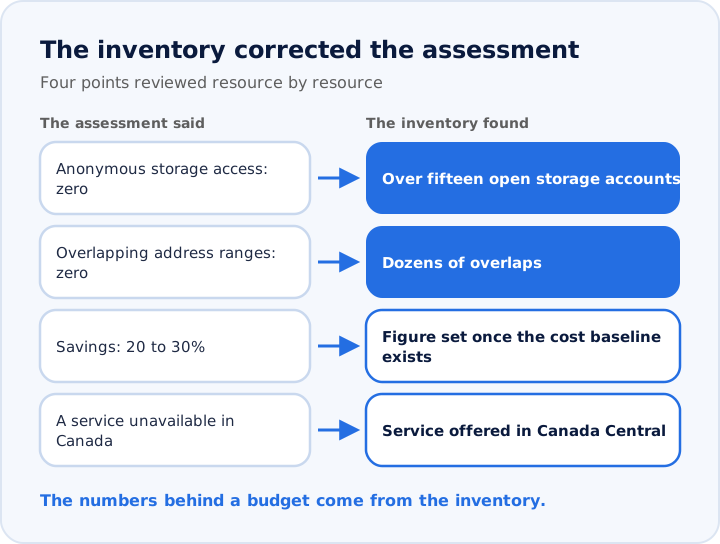
- Storage: the assessment reported zero anonymous access. The inventory found over fifteen storage accounts open to anonymous access, and almost all of them open to all networks.
- Network addressing: the assessment reported zero conflicts. The inventory found dozens of overlapping address ranges.
- Savings: the assessment promised a 20 to 30% reduction. The percentage will come once the cost baseline is set.
- Availability: a service described as unavailable in Canada is offered in the Canada Central region.
Just-in-time admin rights
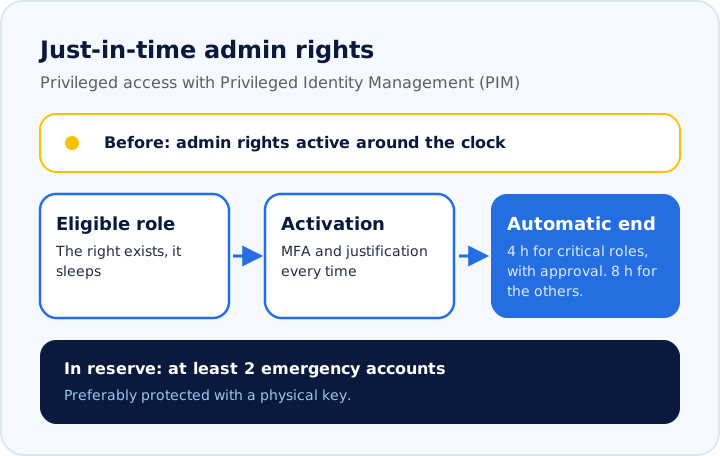
The most serious finding was about access. Every administrator kept their rights around the clock, and most Owner roles were assigned with no condition. A single compromised account therefore gave access to everything, at any time.
The model we chose relies on just-in-time access with Privileged Identity Management (PIM):
- All privileged roles become eligible and are activated when needed.
- Critical roles (Owner, access management, policy management): 4-hour activation, with approval.
- Other roles: 8-hour activation, without approval.
- Every activation: multifactor authentication and a justification.
- At least two emergency accounts, preferably protected with a physical key, to keep control during an outage.
- Group-by-group transition: each assignment is removed once the replacement group is in place and tested.
Audit before you deny
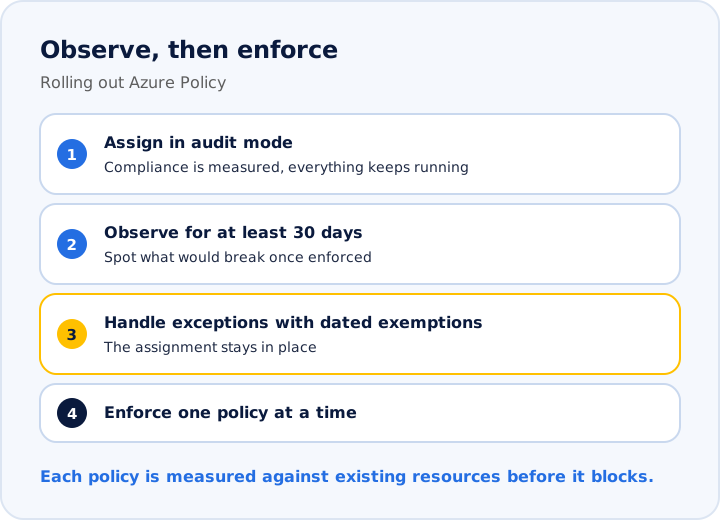
Blocking every non-compliant resource at once can take down a production application. The framework therefore starts with a first batch of about a dozen Azure Policy policies, assigned in DoNotEnforce mode. This mode measures compliance and lets everything run. Microsoft recommends it precisely to evaluate a policy's impact before enforcing it.
The first batch covers the basics: allowed regions, required tags, a central activity log, HTTPS and recent TLS, public access to SQL databases and managed identity.
The sequence: assign in audit mode, observe for at least 30 days, handle each exception with a dated exemption, then switch to enforcement one policy at a time. The assignment stays in place throughout.
Every exemption has a maximum duration. When it expires, it stays on record and stops applying.
“Audit before you deny.”
- Azure Cloud Architect, io4
Canadian regions and Quebec's Law 25
Some resources were running in the United States. The first policy in the batch therefore limits deployments to Canadian regions. A detail that matters: Canada Central is in Toronto, Canada East is in Quebec City. One wave of the roadmap is dedicated to bringing resources outside Canada back home.
Hosting in Toronto remains possible. Quebec's Law 25 then requires a privacy impact assessment before personal information is communicated outside Quebec. Choosing a region therefore becomes a compliance decision as well.
What any organization can take away
- Redo the inventory before building a governance framework, even when an assessment exists.
- Make admin access just-in-time first: it is the broadest risk.
- Put guardrails in audit mode, observe, then enforce them one by one.
- Set the cost baseline before announcing savings.
- Treat the choice of Azure region as a Law 25 question.
Want to talk it through?
Let's spend 30 minutes on your situation.
A free assessment with an io4 architect. No commitment, no pressure.
Book my assessment