+1 888 285 9583
 +33 4 12 39 27 40


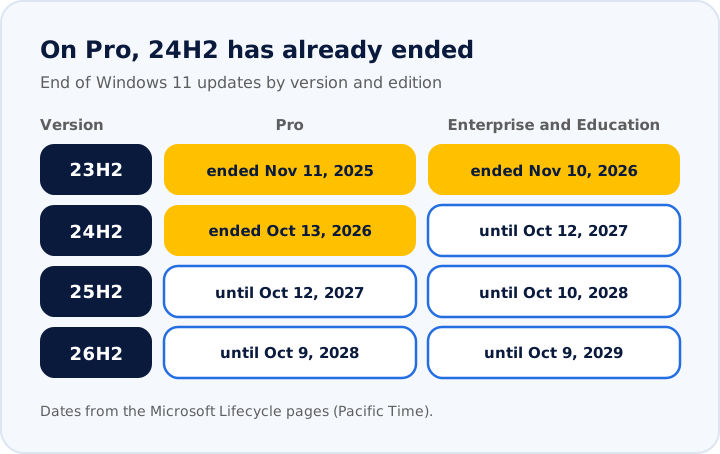
Since November 10, 2026, Windows 11 23H2 Enterprise and Education gets no more updates, and Pro 24H2 has been out of support since October 13. Here is how to find affected devices and move to 26H2.
Windows 11 23H2: the end of updates has arrived
On November 10, 2026, Microsoft released the last security update for Windows 11, version 23H2, Enterprise and Education editions. Devices still running this version will not get any more fixes. They keep working. But every vulnerability found from now on will stay open.
It is not the only deadline. On October 13, 2026, version 24H2 of the Pro edition also stopped getting updates. In one month, two groups of devices fell out of support.
Here is how to tell if your organization is affected, and how to get back to a supported version.
What Microsoft announced
In its Windows message center, on November 10, 2026, Microsoft confirmed that Windows 11 23H2, Enterprise and Education editions, has reached end of updates. The November 2026 security update is the last one available for these editions. Microsoft recommends moving to Windows 11, version 26H2.
For a device still on 23H2 Enterprise or Education, this means three things:
- it no longer gets monthly security updates;
- it stays exposed to every new vulnerability;
- in Intune, a policy that still targets 23H2 is marked "Not supported" and no longer deploys.
Pro or Enterprise: the edition changes the date
The same Windows 11 version does not have the same lifespan everywhere. Microsoft services it for 24 months on the Pro edition, and for 36 months on the Enterprise and Education editions.
In other words, a Pro device still on 24H2 has been out of support for a month, while an Enterprise device on 24H2 still has a year left. To know where you stand, you need two facts for each device: its version and its edition.
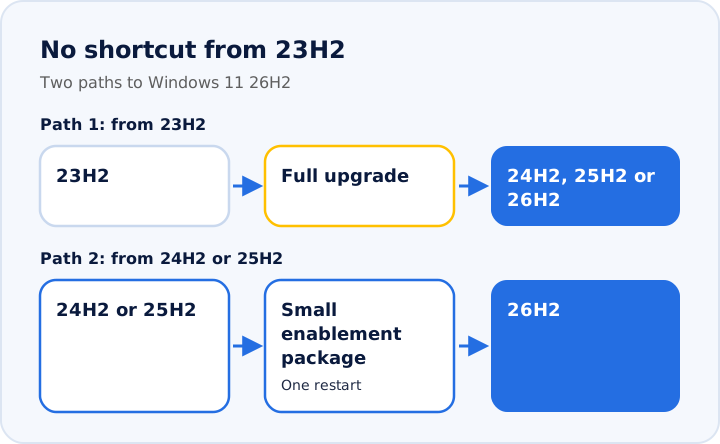
No shortcut from 23H2
Moving from 23H2 to a recent version is not a small update. According to Microsoft, version 24H2 is a full replacement of the operating system, and no enablement package exists to get there from 23H2. A 23H2 device therefore needs a full upgrade to reach 24H2, 25H2 or 26H2. Before it installs, it must also have at least the May 2024 non-security preview update.
It is the opposite for a device already on 24H2 or 25H2. It moves to 26H2 with a small enablement package. According to Microsoft, the install takes a single restart in most cases.
Key point: leaving 23H2 takes a real upgrade, which you test before rolling it out everywhere. After that, version changes get much lighter.
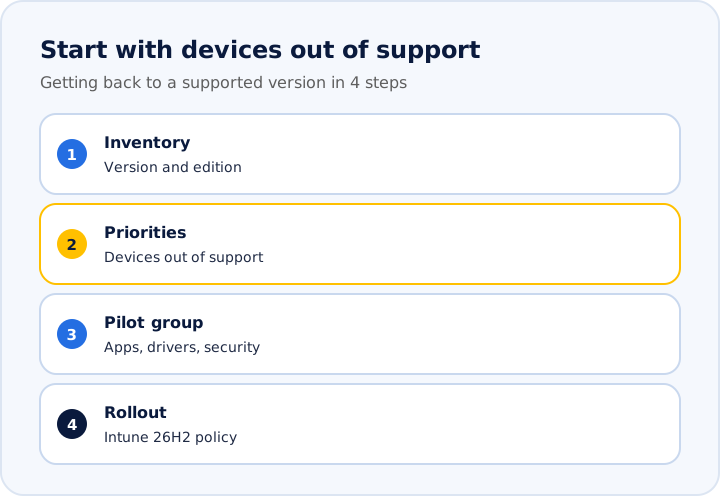
A 4-step plan
- 1. Take inventory. Record the version and edition of each device. In Intune, the Windows device list shows the operating system version. On a single device, the winver command shows it.
- 2. Set priorities. Start with the devices already out of support: Enterprise and Education on 23H2, Pro on 23H2 or 24H2.
- 3. Test with a pilot group. Check your business apps, drivers, VPN and security tools on a few devices before rolling out everywhere. A recent example: on 26H2, Administrator protection, turned on by Microsoft's security baselines, blocked Remote Desktop connections. The October 28, 2026 update (KB5127936) fixed it. A pilot group catches this kind of surprise before everyone else does.
- 4. Roll out with Intune. Create a feature update policy that targets 26H2. Watch the support column: Intune flags a version as "Support Ending" two months before its end date. That is your cue to plan the next version.
What now?
Upgrading to 26H2 is not a one-click job from 23H2. It can still be planned in a few weeks, as long as you know which devices are affected. The io4 team can run this inventory with you and prepare the 26H2 rollout in Intune.
Sources: Microsoft, Windows message center (Nov 10, 2026); Microsoft Learn, Windows 11 Enterprise and Education lifecycle, and Home and Pro lifecycle; What's new in Windows 11 24H2 and 26H2; Windows 11 26H2 known issues (KB5127936); Intune, Windows feature update policies.
Want to talk it through?
Let's spend 30 minutes on your situation.
A free assessment with an io4 architect. No commitment, no pressure.
Book my assessment