 +1 888 285 9583
 +33 4 12 39 27 40


The client
Quebec school service centre
- Sector: Education
- Size: Nearly 10,000 devices
- Region: Quebec
A Quebec school service centre managed nearly 10,000 devices across dozens of schools with aging Configuration Manager servers. The io4 team set up co-management, moved workloads one by one to Microsoft Intune, deployed Windows Autopilot and Shared PC mode for classrooms, then retired the servers, within one school year. Anonymized client: figures are rounded to protect confidentiality.
Results at a glance
Key figures.
< 1 h
To prepare a device
Compared with several hours using an image
3 wks
To prepare back-to-school
Compared with nearly two months before
> 95%
Of devices up to date
Within the month patches are released
100%
Of Configuration Manager servers retired
Fully cloud-based device management
The context
The school service centre brings together dozens of elementary and secondary schools, along with training centres. Its fleet includes nearly 10,000 devices: staff computers, lab workstations and laptops shared by students in the classroom.
All these devices were managed with Configuration Manager, running on servers that had reached end of life. Every summer, the IT team reimaged thousands of devices in a workshop to prepare for back-to-school. Each device took several hours of work, and the full preparation stretched over nearly two months.
IT leadership wanted cloud-based management that is simple to maintain and suited to a fleet spread across a large territory. The constraints were clear:
- A fixed back-to-school date that sets the pace of the project.
- Devices shared by several students over the same school day.
- A small IT team serving dozens of schools, often far apart.
- Classrooms active all year, where every device needs to stay available.
The io4 approach
The io4 team ran the project in four stages over about 12 months: two months of scoping and co-management setup, a gradual move of workloads to Intune over the winter, the rollout of Windows Autopilot and shared devices in the spring, then back-to-school preparation and the retirement of the Configuration Manager servers.
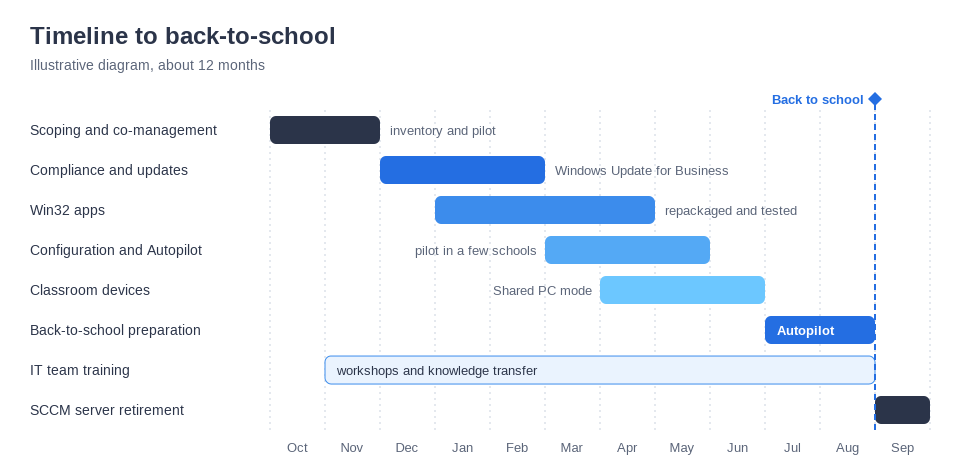
Co-management. Existing devices, already Microsoft Entra hybrid joined, were enrolled in Intune while Configuration Manager kept managing them. Each workload then moved from one tool to the other, first for a pilot group, then for the whole fleet. The IT team kept full control of every device throughout the transition.
Workloads. Compliance policies moved first, tied to Conditional Access. Windows updates followed, with Windows Update for Business rings replacing the patch cycles managed on the servers. Teaching applications were repackaged as Win32 apps, tested in a few schools, then published in Intune. Configuration items were rebuilt in the settings catalog.
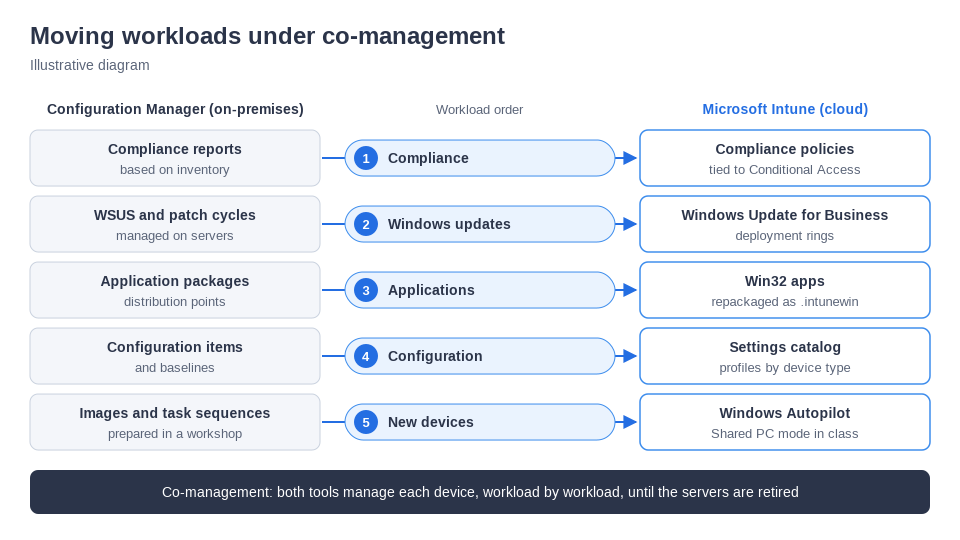
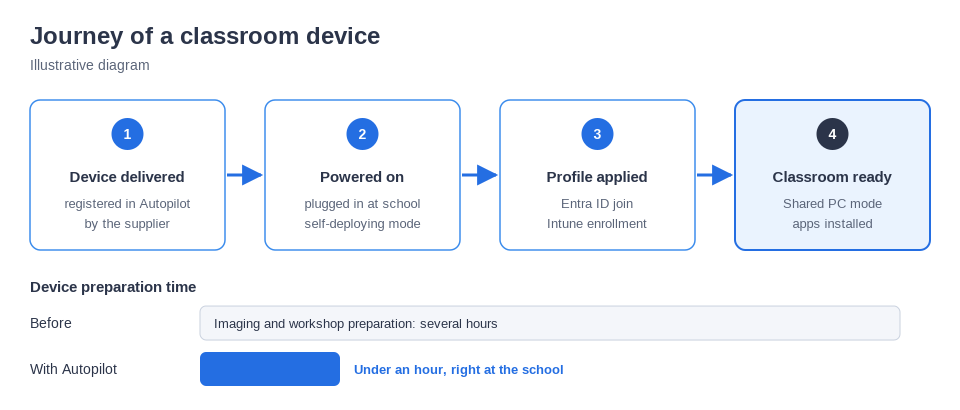
New devices and classrooms. Suppliers now register new devices in Windows Autopilot at the time of order. Staff devices use user-driven mode. Classroom devices use self-deploying mode and a shared device profile: students sign in with their own account, and local profiles are removed automatically based on the defined rules. The IT team took part in hands-on workshops throughout the project and now manages the fleet on its own.
- Starting inventory: nearly 10,000 devices and a few hundred applications, grouped into a standard catalog for each school level.
- Gradual update rings: IT team, pilot schools, then the whole fleet.
- Existing devices converted to Windows Autopilot at their next reset.
- Configuration Manager servers retired once the last workload had moved.
The results
Measured at the back-to-school that followed the project, then over the first term of the school year:
- Nearly 10,000 devices fully managed in Microsoft Intune.
- A device prepared in under an hour with Windows Autopilot, compared with several hours using a workshop image.
- Back-to-school prepared in about three weeks, compared with nearly two months before.
- Over 95% of devices up to date within the month Windows patches are released.
- Configuration Manager servers retired and a lighter on-premises infrastructure.
What other organizations can take away
- Move one workload at a time. Co-management lets you shift compliance, updates, applications and configuration one by one, at your own pace.
- Plan around the school calendar. Back-to-school gives a clear milestone: a spring pilot gets you ready by summer.
- Train the IT team during the project. Hands-on workshops at each step make the team self-sufficient by back-to-school.
Microsoft technologies used
A similar topic?
Let's talk about your context.
A free assessment with the io4 team. No commitment, no pressure. You leave with a reasoned point of view.